

Oct 5 to Oct 11, 2026
Zoom out on the Where map and see a cartoon globe
The map now pulls back to a friendly globe with day and night, paying for another calendar account is smoother on your phone, and picking a time spins round and round.
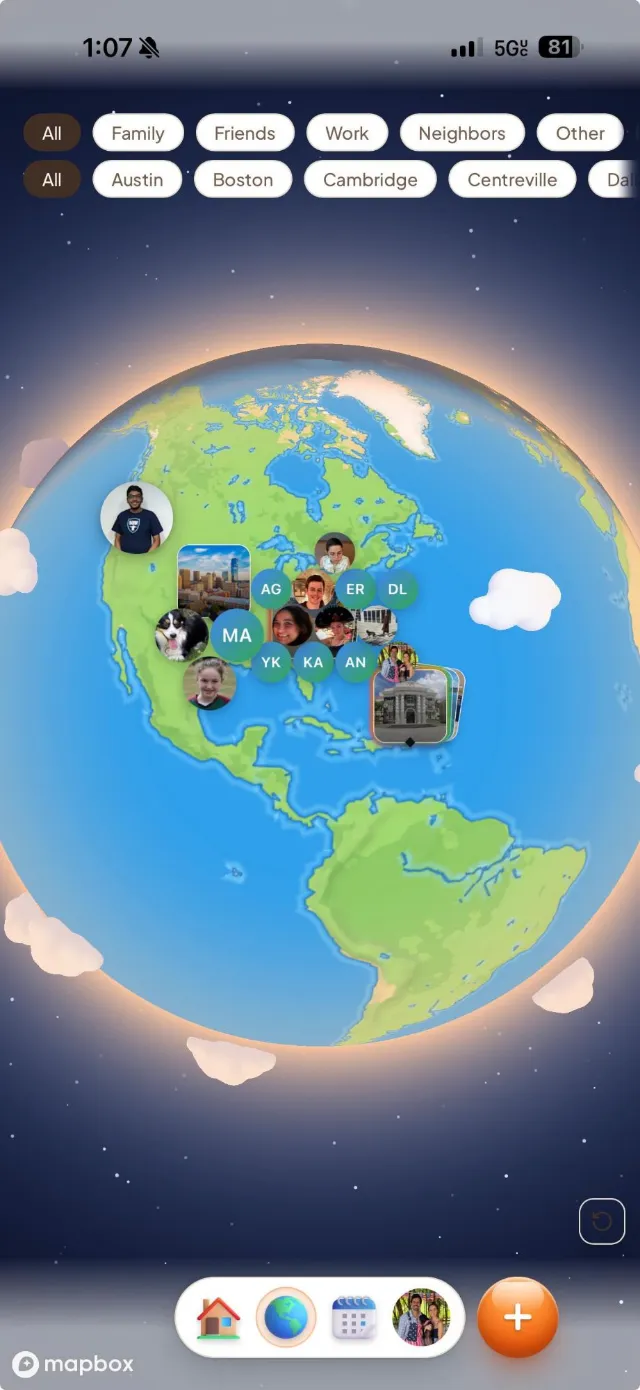
See the whole world on the Where map
Pinch out far enough and the map turns into a globe.
- A cartoon globe. Zoomed out, you see calm land and sea, drifting clouds, a warm glow and stars around the edge.
- Day and night. The shading follows the sun, and city lights come on across the night side.
- Back to the map in one pinch. Zoom in and the globe fades into the regular map, with place names returning at the same moment.
Add another calendar account with less friction
Buying and connecting accounts got several fixes this week.
- The paywall is a full page on your phone. It looks like a Settings page, with a back arrow, and the payment form has room to breathe.
- Clear messages when checkout can’t start. You go back to the offer and are told whether you were charged and what to try next.
- Backing out is safe. Tapping back right after Buy no longer leaves a blank page on your next try.
- Returning buyers can check out again. Someone with an earlier purchase on file was blocked, and that is fixed.
- Apple accounts in the iPhone app. You can add a second Apple account without being asked to buy a slot, and the slot count no longer shows in Settings > Info.
Set event times faster
The Start time and End time pickers feel like a real dial.
- Wheels that go round. After 12 comes 1, and after :55 comes :00, in both directions.
- AM and PM follow along. Pass 12 on the hour wheel and AM or PM flips with it. The date stays put.
Export PDF fits your phone
Find it in Settings under Exports & Subscriptions.
- A page that scrolls. The Generate button and the preview are no longer cut off.
- Dark mode stays on. Only the paper sheet is light, since the PDF is always light.
The app opens faster
Less to download before you see something.
- Conmigo.io shows up sooner. The home page now starts with the headline and the dome of photos, then builds the rest.
- Calendar, Home and Where load on their own. Switching tabs still happens without a spinner.
- Nicer link previews. Sharing conmigo.io shows the same tagline everywhere, with a new picture.
Smaller improvements
A few more fixes.
- Events without a time zone now sort by your own time zone, so a 3 pm event no longer lands ahead of a 10 am one.
- Docs: on a phone, the row of categories scrolls to keep the one you are reading in view.
- Changelog: a menu of weeks sits beside the entries.
- Help pages now match today’s Settings names and steps.
- The privacy notice names Google Analytics and PostHog. Microsoft Clarity has been removed.
- Fonts are now hosted by Conmigo, so no page loads them from Google.